

Canon PIXMA iP8720 Review (2026): Best Photo Printer Under $300?
*Some links in this article are affiliate links. If you purchase through them, it helps support my work at no extra cost to you.
==========
Last Updated: July 2026
Canon PIXMA iP8720 Overview
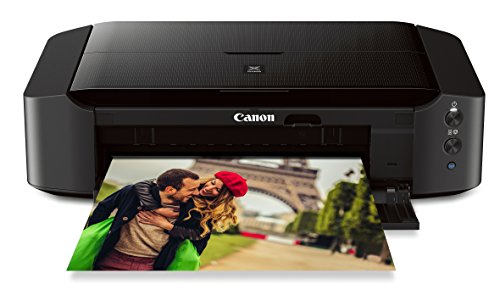
The Canon PIXMA iP8720 is one of those rare photography products that has outlived multiple camera generations while still remaining genuinely useful.
Even in 2026, years after its original release, it continues to be one of the most affordable ways for photographers to print borderless 13×19-inch photographs at home.
I’ve owned the iP8720 for several years and use it regularly for:
landscape test prints
portfolio pieces
gifts for family and friends
black-and-white proof prints
evaluating images before ordering large wall art from a professional lab
That long-term experience is why I still recommend it to many photographers despite newer printers entering the market.
The key question is no longer “Is the iP8720 a good printer?”—it clearly is.
The real question is:
Does it still make sense to buy in 2026 when printers like the Canon PRO-200 and Epson ET-8550 exist?
This review focuses on real-world use rather than marketing specs, including print quality, ink costs, reliability, paper choices, and where the iP8720 fits among Canon’s newer photo printers.
Quick Verdict
Canon PIXMA iP8720
Overall rating 9.2/10
Best for: photographers who want high-quality 13×19 prints without spending hundreds more on a professional pigment printer.
Pros
Excellent photo quality for the price
Prints up to 13×19 inches
Vibrant, natural color reproduction
Dedicated gray ink improves black-and-white prints
Compact for a wide-format photo printer
Great value for enthusiasts and portfolio printing
Cons
Dye inks are less archival than pigment inks
Ink costs add up if you print frequently
No scanner or copier
Slower than newer professional photo printers
Not ideal for high-volume print businesses
Canon Photo Printer Comparison (2026)
| Printer | Best For | Ink Type | Max Print Size | Biggest Strength | My Recommendation |
|---|---|---|---|---|---|
| Canon PIXMA iP8720 | Hobbyists, landscape photographers, first-time photo printing | 6-color dye | 13×19" | Outstanding value and beautiful photo quality | ⭐ Best Budget Choice |
| Canon PRO-200 | Enthusiasts selling prints, advanced photographers | 8-color dye | 13×19" | Better color gamut, smoother gradients, faster printing | ⭐ Best Enthusiast Upgrade |
| Canon imagePROGRAF PRO-310 | Fine art photographers, galleries, exhibitions | 10-color pigment | 13×19" | Museum-quality archival prints with exceptional color accuracy | ⭐ Best Professional 13" Printer |
| Canon imagePROGRAF PRO-1100 | Professional studios and serious printmakers | 12-color pigment | 17×22" | Larger prints, deeper blacks, outstanding archival longevity | ⭐ Ultimate Fine Art Choice |
| Epson EcoTank ET-8550 | High-volume home printing | 6-color EcoTank dye | 13×19" | Extremely low ink costs and economical long-term ownership | ⭐ Lowest Cost Per Print |
Canon PIXMA iP8720
Best For: Hobbyists, landscape photographers, first-time photo printing
Ink Type: 6-color dye
Max Print Size: 13×19"
Biggest Strength: Outstanding value and beautiful photo quality
Recommendation: ⭐ Best Budget Choice
Canon PRO-200
Best For: Enthusiasts selling prints, advanced photographers
Ink Type: 8-color dye
Max Print Size: 13×19"
Biggest Strength: Better color gamut, smoother gradients, faster printing
Recommendation: ⭐ Best Enthusiast Upgrade
Canon imagePROGRAF PRO-310
Best For: Fine art photographers, galleries, exhibitions
Ink Type: 10-color pigment
Max Print Size: 13×19"
Biggest Strength: Museum-quality archival prints with exceptional color accuracy
Recommendation: ⭐ Best Professional 13" Printer
Canon imagePROGRAF PRO-1100
Best For: Professional studios and serious printmakers
Ink Type: 12-color pigment
Max Print Size: 17×22"
Biggest Strength: Larger prints, deeper blacks, outstanding archival longevity
Recommendation: ⭐ Ultimate Fine Art Choice
Epson EcoTank ET-8550
Best For: High-volume home printing
Ink Type: 6-color EcoTank dye
Max Print Size: 13×19"
Biggest Strength: Extremely low ink costs and economical long-term ownership
Recommendation: ⭐ Lowest Cost Per Print
Which One Would I Buy?
Buy the Canon PIXMA iP8720 if...
You want the best photo quality for around $300.
You print occasionally.
You're learning to print your own photography.
You want beautiful 13×19 prints without spending a fortune.
Buy the Canon PRO-200 if...
You sell prints occasionally.
You want noticeably better color accuracy.
You want to stay with dye inks but step into Canon's professional photo lineup.
Buy the Canon imagePROGRAF PRO-310 if...
Print longevity matters.
You exhibit or sell fine art.
You want pigment inks and gallery-quality output.
You primarily print up to 13×19 inches.
Buy the Canon imagePROGRAF PRO-1100 if...
Printing is part of your business.
You want to produce larger 17×22-inch prints.
You want Canon's highest-end desktop photo printer with exceptional monochrome performance and archival quality.
Buy the Epson EcoTank ET-8550 if...
Ink cost is your biggest concern.
You print frequently.
You also need scanning and copying.
You don't mind trading a little convenience for dramatically lower operating costs over time.
My Recommendation
If I were recommending these printers to photographers today, this is how I'd rank them:
Best Overall Value: Canon PIXMA iP8720
Still one of the easiest photo printers to recommend. The combination of price, image quality, reliability, and 13×19 printing makes it an outstanding first dedicated photo printer.
Best Upgrade: Canon PRO-200
The sweet spot for photographers who are starting to sell prints or want noticeably better color and tonal reproduction without moving to pigment inks.
Best Professional Choice: Canon imagePROGRAF PRO-310
If your goal is gallery-quality 13×19 prints with pigment inks, this is where I'd invest.
Best No-Compromise Printer: Canon imagePROGRAF PRO-1100
Designed for photographers who want larger prints, premium fine art media support, and the highest image quality Canon offers in a desktop printer.
Best Budget for Heavy Printing: Epson EcoTank ET-8550
If you print dozens or even hundreds of photos each month, the refillable ink system can save a significant amount over time, making it one of the most economical wide-format photo printers available.
Who Is the Canon PIXMA iP8720 For?
The iP8720 sits in a sweet spot between cheap office printers and expensive professional photo printers.
I think it’s an excellent choice for:
landscape photographers
travel photographers
wildlife photographers
hobbyists ready to print their own work
photography students
artists selling occasional prints online
photographers building a portfolio
If you’ve never owned a dedicated photo printer before, the ability to print a full 13×19-inch photograph from your own desk is a huge creative upgrade.
Who Should Skip It?
Consider a different printer if you:
print hundreds of photos per month
need museum-grade archival longevity
sell large volumes of fine art prints
want an all-in-one scanner/copier
primarily print office documents
For those users, a Canon PRO-200, Canon PRO-1100, or Epson ET-8550 is usually a better long-term investment.
My Long-Term Experience Using the Canon PIXMA iP8720
I primarily use the iP8720 for landscape photography from New England, Colorado, and the U.S. Virgin Islands.
One of the biggest benefits has been seeing my images on paper before ordering larger prints from a professional lab. It’s much easier to notice:
oversharpening
color casts
tonal issues
distracting details
composition problems
Many of the prints hanging in my office began as 13×19 test prints from this printer.
Reliability has also been surprisingly good. I don’t print every day, but with occasional nozzle checks and regular use, the printer has remained dependable for years without any major issues.
That real-world consistency is one reason I still recommend it.
Key Specifications
| Feature | Canon PIXMA iP8720 |
|---|---|
| Maximum print size | 13 × 19 in |
| Ink system | 6-color dye-based |
| Maximum resolution | 9600 × 2400 dpi |
| Borderless printing | Yes |
| Wireless printing | Yes |
| USB connection | Yes |
| Mobile printing | AirPrint, Canon PRINT app |
| Scanner / Copier | No |
| Best for | Photography |
Maximum Print Size
Canon PIXMA iP8720: 13 × 19 in
Ink System
Canon PIXMA iP8720: 6-color dye-based
Maximum Resolution
Canon PIXMA iP8720: 9600 × 2400 dpi
Borderless Printing
Canon PIXMA iP8720: Yes
Wireless Printing
Canon PIXMA iP8720: Yes
USB Connection
Canon PIXMA iP8720: Yes
Mobile Printing
Canon PIXMA iP8720: AirPrint, Canon PRINT app
Scanner / Copier
Canon PIXMA iP8720: No
Best For
Canon PIXMA iP8720: Photography
On paper these specifications may not seem revolutionary, especially considering the printer's age. Where it separates itself is the combination of affordability, print quality, and the ability to produce large-format photographs from a relatively compact desktop printer.
First Impressions
When I first unpacked the iP8720, what surprised me most wasn't the printer itself—it was the maximum print size.
Most home printers top out at letter or legal paper. The ability to load 13×19 photo paper immediately opens creative possibilities that simply aren't available on smaller printers.
The printer also feels well built without being oversized. It fits comfortably in a home office and doesn't dominate the room the way many professional printers do.
Setup was straightforward, wireless connectivity was easy to configure, and within a short time I was printing my first landscape photographs.
What impressed me most, however, wasn't the setup process. It was the first finished print. The colors were vibrant without looking artificial, fine details remained sharp, and the overall image quality exceeded what I expected from a relatively affordable photo printer.
That first print quickly convinced me this printer would become a regular part of my photography workflow.

Hot off the press! A 13”x19” fireworks photography print from my Canon Pixma iP8720 printer.
Why I Still Recommend It in 2026
Technology changes quickly, yet the fundamentals of photo printing haven't changed nearly as much as cameras have.
A great photograph still depends on sharp optics, good exposure, careful editing, and a printer capable of reproducing those details accurately.
Despite newer printers entering the market, the Canon PIXMA iP8720 continues to occupy a unique position. It offers large-format printing, excellent color quality, and dependable performance at a price that remains approachable for enthusiasts.
For photographers who aren't ready to spend significantly more on a professional Canon PRO printer, I still think it represents one of the best values available.
Print Quality & Color Accuracy
The biggest reason I've kept the Canon PIXMA iP8720 on my desk for so many years is simple: the prints consistently look better than most people expect from a printer in this price range.
It's easy to focus on specifications like "9600 × 2400 dpi" or "six-color ink system," but specifications don't hang on your wall. Finished prints do.
After printing hundreds of photographs—from New England coastlines and Connecticut waterfalls to Colorado mountains and Caribbean beaches—I can confidently say the iP8720 continues to produce excellent photographic prints when paired with quality paper and a properly edited file.
For photographers who primarily share images online, making your first large print can be eye-opening. Fine details, subtle gradients, and color transitions become much easier to evaluate than they ever appear on a monitor.
That's one of the biggest reasons I still print regularly.
Landscape Photography Performance
Landscape photography is where this printer feels most at home.
It reproduces subtle color transitions exceptionally well, particularly in:
Sunrise and sunset skies
Forests with layered greens
Coastal scenes
Snow-covered landscapes
Mountain ridgelines
Water reflections
One thing I've always appreciated is that Canon doesn't aggressively sharpen prints. Instead, the printer reproduces what's actually in the image.
If your editing is clean, your print looks clean.
If your editing has halos or over-sharpening, you'll notice that too.
That makes the iP8720 an excellent learning tool because it exposes editing mistakes that are easy to overlook on a monitor.
Color Accuracy
For everyday photographic printing, color accuracy is excellent.
The six-color dye ink system produces smooth gradients and vibrant output without looking excessively saturated.
In my experience:
Blues
remain rich while still maintaining subtle tonal differences.
Greens
retain separation rather than blending into one uniform color.
Warm sunset colors
look vibrant without becoming unnaturally orange or red.
Water
maintains depth and smooth transitions, particularly in long-exposure images.
Like any serious photo printer, you'll get the best results from a calibrated monitor and proper color management.
If your display isn't calibrated, the printer isn't the weak link.
Black & White Printing
Many consumer photo printers struggle with black-and-white photography.
The PIXMA iP8720 performs surprisingly well thanks to its dedicated gray ink cartridge.
Compared to printers that create grayscale entirely from color inks, you'll generally notice:
smoother tonal transitions
cleaner midtones
fewer unwanted color casts
better highlight detail
It won't completely replace a professional pigment printer designed specifically for fine art monochrome work, but for portfolios, home display, and personal projects, it's impressive.
Several of my black-and-white coastal photographs have come from this printer and still look excellent years later.
Sharpness & Detail
One area that surprised me when I first bought the printer was how much detail it retained in larger prints.
At 13×19 inches:
foliage remains well defined
rock textures stay crisp
distant mountains retain separation
water textures remain natural
Viewed at a normal distance, most people would never guess these prints came from what many consider an entry-level photo printer.
That's one of the reasons the iP8720 has remained popular for so long.
Best Paper for the Canon iP8720
Paper has a much bigger impact on image quality than many photographers realize.
The same image can look average on inexpensive paper and outstanding on professional photo media.
These are the papers I've had the best experience with.
Canon Pro Luster (My Favorite)
If I could recommend only one paper for this printer, it would be Canon Pro Luster.
It's the paper I reach for most often because it offers an excellent balance between glossy and matte finishes.
Why I like it:
excellent color reproduction
subtle texture
reduced glare
professional appearance
fingerprints are less noticeable
Most of my landscape test prints are produced on Pro Luster.
Canon Pro Platinum
When I want maximum color impact, I switch to Canon Pro Platinum.
This paper produces:
deeper blacks
stronger contrast
brilliant color
exceptionally sharp detail
It's particularly effective for:
sunsets
dramatic storm clouds
waterfalls
fireworks
night photography
The glossy finish isn't for everyone, but it can make colorful landscape photographs really stand out.
Matte Fine Art Papers
Matte papers completely change the personality of an image.
I especially enjoy using them for:
foggy mornings
winter landscapes
minimalist compositions
black-and-white photography
Compared to glossy papers, matte stock provides:
softer contrast
less glare
a more artistic presentation
While I don't use matte paper for every project, it's worth experimenting with if your style leans toward mood and atmosphere rather than vivid color.
Avoid Cheap Photo Paper
If you're investing in a dedicated photo printer, don't sabotage the results with bargain-bin paper.
Lower-quality glossy papers often:
exaggerate saturation
introduce uneven reflections
fingerprint easily
reduce overall image quality
Good paper isn't cheap, but it's one of the best upgrades you can make.
Real-World Printing Results
After years of ownership, I've settled into a workflow that has remained remarkably consistent.
When I return from photographing a new location, I'll usually edit several images before selecting a handful to print.
Those prints serve multiple purposes.
Evaluating Images
Seeing a photograph on paper often reveals things I missed while editing.
Sometimes I'll notice:
overly bright highlights
shadows that are too dark
excessive sharpening
distracting composition elements
I'd much rather catch those issues on a home print than after ordering expensive wall art from a professional lab.
Portfolio Prints
The iP8720 has produced numerous portfolio pieces over the years.
Many visitors to my office assume the prints came from a professional print lab.
That says a lot about what this printer is capable of.
Gifts
I've also made countless prints for friends and family.
A thoughtfully printed landscape almost always feels more personal than simply sending someone a digital file.
It's one of the underrated benefits of owning a dedicated photo printer.
Testing Before Selling Prints
Although I use professional labs for customer orders and fine art wall prints, I frequently print smaller versions first.
This lets me evaluate:
composition
color balance
sharpening
cropping
overall impact
That extra step has saved me from ordering large prints that needed further adjustments.
My Biggest Surprise
After all these years, what surprises me most isn't how good the printer was when it launched.
It's how well it still holds up today.
Newer models certainly offer improvements.
But when someone asks me whether the Canon PIXMA iP8720 can still produce beautiful photographic prints in 2026, my answer is still the same:
Absolutely.
For photographers entering the world of home printing, it remains one of the best values available.
Ink Costs & Print Speed
If there's one area where the Canon PIXMA iP8720 shows its age, it's ink economy.
That's true of nearly every cartridge-based photo printer, but it's especially noticeable once you begin printing larger photographs regularly.
The iP8720 uses six individual dye-based ink cartridges:
Black
Cyan
Magenta
Yellow
Photo Cyan
Photo Magenta
The advantage is obvious: you only replace the color you've used.
The downside is capacity.
The cartridges aren't particularly large, so photographers who frequently print 13×19 images will work through ink faster than they might expect.
That doesn't mean the printer is expensive to own—it simply means it's designed for photographers who value image quality over the absolute lowest operating cost.
What I've Experienced
Over several years of ownership, I've noticed ink consumption depends far more on what you're printing than how often you print.
Images that consume the most ink include:
dramatic sunsets
colorful fall foliage
Milky Way photography
fireworks
dense forest scenes
highly saturated coastal sunsets
By comparison:
snowy landscapes
black-and-white prints
minimalist compositions
foggy scenes
often use noticeably less ink.
The biggest surprise for new owners usually isn't the prints themselves.
It's maintenance.
Maintenance Uses Ink Too
Like nearly every inkjet printer, the iP8720 performs cleaning cycles.
These help keep the print head healthy but consume ink.
The printer is happiest when it's used regularly.
I try to print something every week or two, even if it's only a small 4×6 test image.
Doing that has dramatically reduced the need for deeper cleaning cycles.
Over years of ownership, I've had remarkably few problems simply because I don't let it sit unused for months at a time.
Print Speed
The iP8720 isn't a production printer.
It's built for careful photographic printing rather than volume.
Typical print times are approximately:
| Print Size | Approximate Time |
|---|---|
| 4×6 | 30–40 seconds |
| 8×10 | 1–2 minutes |
| 13×19 | Several minutes (depending on quality settings) |
4×6
Approximate Time: 30–40 seconds
8×10
Approximate Time: 1–2 minutes
13×19
Approximate Time: Several minutes (depending on quality settings)
Personally, I've never considered this a drawback.
Printing photographs isn't like printing office documents.
Most of my workflow looks like this:
Edit in Lightroom
Soft-proof the image
Load premium paper
Print
Walk away while it finishes
Evaluate the finished print under good lighting
It's a slower, more deliberate creative process—and that's exactly what I want from a dedicated photo printer.
Connectivity & Workflow
Even though the iP8720 has been around for years, it still fits easily into a modern workflow.
It supports:
Wi-Fi printing
USB connection
Apple AirPrint
Canon PRINT app
I usually print directly from Lightroom over Wi-Fi without any issues.
For especially important portfolio prints, however, I still prefer USB simply because it's one less variable.
Canon's software isn't particularly exciting, but that's not necessarily a bad thing.
Most photographers will spend nearly all of their time printing directly from Lightroom or Photoshop anyway.
Long-Term Reliability
One of the reasons I continue recommending the iP8720 is simple:
It's been reliable.
Mine has been in regular use for years.
Outside of routine maintenance, nozzle checks, and the occasional cleaning cycle, it has required very little attention.
That reliability is worth mentioning because many review articles are written after only a few days or weeks with a product.
This review reflects years of ownership.
The printer has become a dependable part of my photography workflow.
Canon iP8720 vs PRO-200 vs ET-8550 vs XP-15000
Canon PIXMA iP8720 vs Canon PRO-200
The PRO-200 is probably the most natural upgrade path.
While the iP8720 is aimed at serious enthusiasts, the PRO-200 moves firmly into professional territory.
Choose the iP8720 if:
you want outstanding image quality at a lower price
you mainly print for yourself
you create portfolio pieces
you occasionally sell prints
you're entering home photo printing
Choose the PRO-200 if:
print quality is your highest priority
you regularly sell prints
you want a wider color gamut
you produce more client work
you're comfortable spending considerably more upfront
The PRO-200 produces richer tonal transitions and more refined color reproduction, especially in difficult gradients and shadow detail, making it a strong step up for photographers ready to invest in a more advanced workflow.
Canon PIXMA iP8720 vs Canon imagePROGRAF PRO-310
The newer imagePROGRAF PRO-310 replaces the highly regarded PRO-300 and is one of Canon's flagship 13-inch pigment printers.
Unlike the iP8720's six dye-based inks, the PRO-310 uses a 10-ink pigment system with Chroma Optimizer, delivering deeper blacks, improved color accuracy, and significantly better archival longevity.
The PRO-310 is an excellent choice if you:
sell fine art prints
exhibit your work
print on premium fine art papers
want museum-quality longevity
need the best black-and-white performance
For many hobbyists, however, it may be more printer than necessary.
If most of your printing consists of portfolio pieces, gifts, proof prints, or personal projects, the iP8720 remains a far more affordable way to achieve excellent photographic results.
Canon PIXMA iP8720 vs Canon imagePROGRAF PRO-1100
If the PRO-310 is designed for serious enthusiasts and professionals, the PRO-1100 is built for photographers who want a true fine art printing system.
The PRO-1100 expands maximum print size to 17×22 inches, uses an 11-color pigment ink system plus Chroma Optimizer, and is optimized for gallery-quality exhibition prints with exceptional longevity and monochrome performance.
I generally recommend the PRO-1100 for photographers who:
regularly sell large fine art prints
exhibit in galleries
require museum-grade archival quality
want to produce their own final customer artwork
For everyone else—including many enthusiasts—the additional cost is difficult to justify.
Professional print labs can still produce exceptional large-format prints whenever needed, allowing the iP8720 to remain an affordable home printing solution.
Canon PIXMA iP8720 vs Epson EcoTank ET-8550
This comparison comes down to one question:
Do you care more about ink cost or print character?
The ET-8550's refillable ink tanks dramatically reduce long-term printing costs, making it one of the best options for photographers who print frequently.
Choose the ET-8550 if you:
print every week
create lots of proof prints
run a busy home studio
value low operating costs
Choose the iP8720 if you:
print occasionally
prefer Canon's color rendering
want a simpler cartridge-based workflow
don't mind paying more per print
For heavy users, the Epson will almost certainly become less expensive to operate over time.
Canon PIXMA iP8720 vs Epson XP-15000
The XP-15000 remains one of the closest competitors to the iP8720.
Both target photographers who want:
13×19 printing
relatively compact desktop printers
affordable entry into large-format photography printing
The Epson tends to produce slightly more saturated images thanks to its expanded ink set, while I generally find the Canon produces slightly more natural-looking landscape photographs.
Both are capable printers.
If you're already invested in Canon cameras and color workflows, the iP8720 integrates very naturally into that ecosystem.
Where the Canon PIXMA iP8720 Still Fits in 2026
After spending years using this printer, I think its role has become even clearer.
It isn't trying to compete with Canon's professional imagePROGRAF lineup.
Instead, it occupies one of the most useful positions in Canon's printer lineup:
affordable enough for enthusiasts
capable enough to produce beautiful 13×19 photographs
reliable enough for years of regular use
simple enough that printing never feels intimidating
That's a combination that's surprisingly difficult to find.
For many photographers, it's still the easiest way to start making serious photographic prints at home without jumping directly into a much more expensive professional printing system.
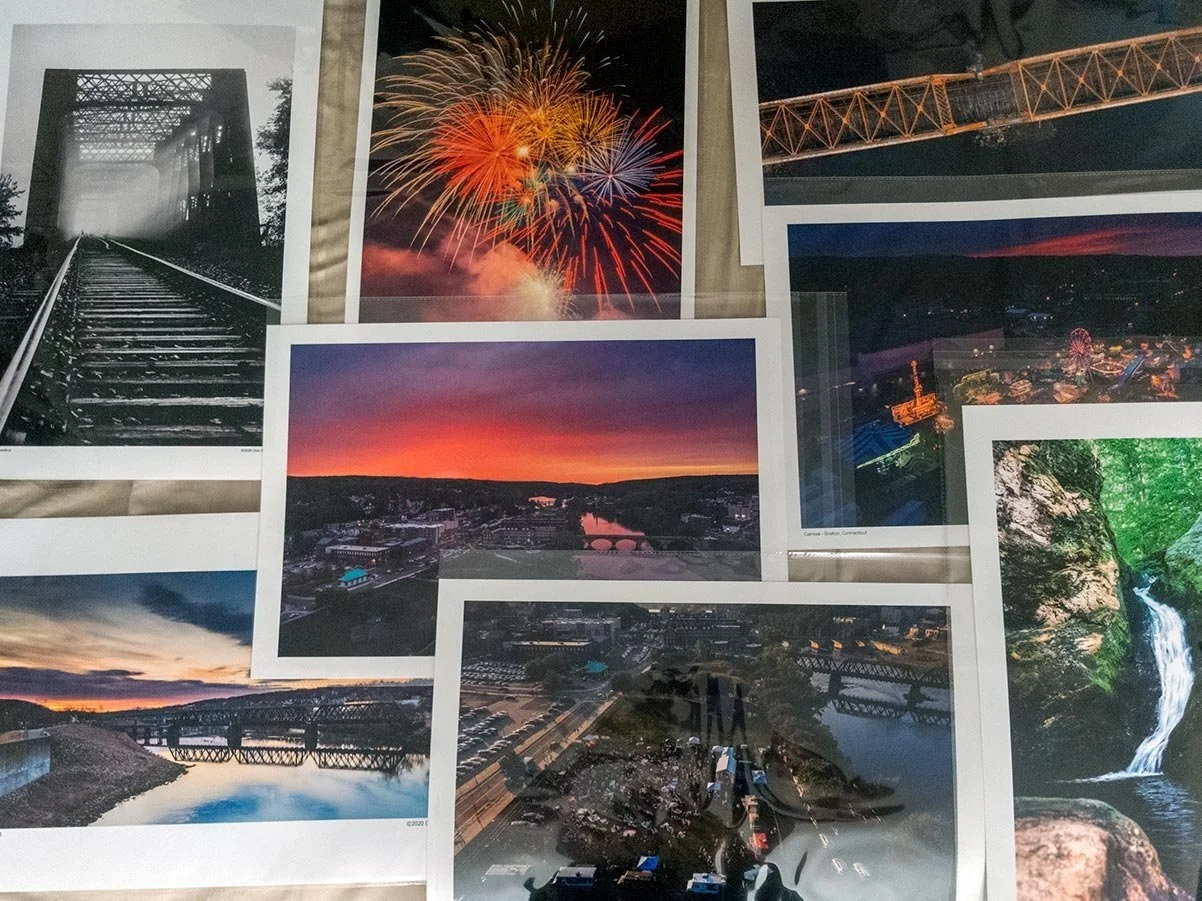
Several photography prints produced by my Canon Pixma iP8720 printer.
Which Printer Should You Buy?
Should You Buy the Canon PIXMA iP8720 in 2026?
After using the Canon PIXMA iP8720 for several years, I think the answer depends less on how good the printer is and more on what kind of photographer you are.
That's an important distinction because there are now far more options than there were when the iP8720 was originally released.
If you're expecting a printer that competes with Canon's professional imagePROGRAF lineup, you'll probably be disappointed.
If you're looking for an affordable way to create beautiful 13×19 prints at home, however, the iP8720 still deserves serious consideration.
Buy the Canon PIXMA iP8720 If...
I think this printer is an excellent fit if you:
Want to start printing your own photography
Primarily shoot landscapes, travel, wildlife, or nature
Want borderless prints up to 13×19 inches
Create portfolio prints
Like evaluating photographs on paper before sending them to a professional lab
Occasionally sell prints but don't need museum-grade archival longevity
Want excellent print quality without spending well over $500 on a printer
For many photographers, this is the sweet spot.
It offers enough quality to make you proud of what comes off the printer while remaining affordable enough that buying one doesn't feel like a major business investment.
Skip the Canon PIXMA iP8720 If...
While I still recommend it to many photographers, it isn't the right choice for everyone.
I'd look elsewhere if you:
Print hundreds of photographs every month
Need the absolute lowest ink cost per print
Produce gallery or museum-quality fine art editions
Need scanning and copying functions
Want the latest printer technology
Need prints with maximum archival longevity
In those cases, you'll probably be happier with one of Canon's imagePROGRAF printers or an Epson EcoTank system.
Which Canon Photo Printer Should You Buy?
One question I receive fairly often is:
"If not the iP8720, what should I buy instead?"
Here's how I currently look at Canon's lineup.
Canon PIXMA iP8720
Best for:
Hobbyists
Landscape photographers
Travel photographers
Students
Home printing
Portfolio building
First dedicated photo printer
Canon PRO-200
A noticeable step up in print quality while remaining approachable for enthusiasts.
Best for:
Serious enthusiasts
Small print businesses
Client work
Higher-end portfolios
More demanding color accuracy
If you regularly sell prints but aren't ready for a full pigment workflow, this is probably the printer I'd recommend most often.
Canon imagePROGRAF PRO-310
This is where Canon's professional pigment lineup begins.
Ideal for photographers who want:
exceptional black-and-white output
premium fine art papers
archival pigment inks
exhibition-quality work
museum-quality longevity
The improvement is noticeable—but so is the price.
Canon imagePROGRAF PRO-1100
This is a different class of printer altogether.
With support for prints up to 17×22 inches, an expanded pigment ink system, and exceptional tonal control, it's designed for photographers producing gallery-quality work at larger sizes.
It's an incredible printer—but one that makes the most sense if printing itself has become a significant part of your business.
If You Already Use a Professional Print Lab...
Many photographers ask whether buying a printer is worthwhile if they already order prints from companies like WhiteWall, Bay Photo, Nations Photo Lab, or WHCC.
For me, the answer is yes.
I still use professional labs for customer orders and large wall art.
But having a photo printer in my office completely changed my workflow.
Being able to print an image immediately allows me to:
evaluate sharpening
judge color more accurately
catch distractions I missed on screen
compare multiple edits side by side
experiment with different crops
test new papers before placing expensive lab orders
In many cases, a single avoided reprint from a lab can offset a surprising amount of ink and paper.
Best Accessories for the Canon PIXMA iP8720
If you're buying the printer, there are a few accessories I'd recommend purchasing at the same time.
Extra Ink Set
Don't wait until you're halfway through a large print.
Keeping a complete replacement set on hand avoids interrupting a project when one cartridge runs empty.
Canon Pro Luster Paper
This continues to be my favorite everyday paper.
It offers an excellent balance of:
color
contrast
texture
durability
fingerprint resistance
If someone asked me to recommend one paper to start with, this would be it.
Canon Pro Platinum
For dramatic sunsets, colorful landscapes, and vibrant travel photography, Pro Platinum produces outstanding results with rich contrast and deep color.
Premium Matte Paper
Matte papers create an entirely different look.
They're particularly well suited for:
fog
forests
black-and-white photography
winter scenes
minimalist landscapes
If you've never experimented with matte fine art paper, it's worth trying.
My Recommended Print Settings
These are the settings I use most often when printing landscapes.
| Setting | Recommendation |
|---|---|
| Paper | Canon Pro Luster |
| Print Quality | High |
| Color Management | Lightroom or Photoshop |
| Rendering Intent | Perceptual |
| Borderless | Enabled |
| Printer Color Management | Disabled |
| Monitor | Hardware calibrated whenever possible |
Paper
Recommendation: Canon Pro Luster
Print Quality
Recommendation: High
Color Management
Recommendation: Lightroom or Photoshop
Rendering Intent
Recommendation: Perceptual
Borderless
Recommendation: Enabled
Printer Color Management
Recommendation: Disabled
Monitor
Recommendation: Hardware calibrated whenever possible
Final Verdict
Overall Rating: 9.3 / 10
The Canon PIXMA iP8720 has now been on the market for many years, yet it's still one of the easiest photo printers to recommend.
Not because it's the newest.
Not because it has the most advanced technology.
But because it continues to solve a problem many photographers have:
It makes large-format photography printing approachable.
After years of ownership, I still regularly use mine for:
evaluating new landscape photographs
testing edits before sending files to a professional lab
printing gifts for family and friends
creating portfolio pieces
enjoying my own photography away from a computer screen
Would I recommend it to every photographer?
No.
Professional printmakers and high-volume businesses should look toward Canon's imagePROGRAF lineup or comparable pigment printers.
But for enthusiasts, advanced hobbyists, students, and photographers taking their first serious step into home printing, the Canon PIXMA iP8720 remains one of the best values available in 2026.
It's one of those rare products that has outlived multiple generations of newer technology—not because it's flashy, but because it simply continues to do its job exceptionally well.
Frequently Asked Questions
Is the Canon PIXMA iP8720 still worth buying in 2026?
Yes.
Even though it's an older printer, it still offers an excellent balance of price, print quality, and large-format capability. For photographers who want to print beautiful 13×19 images at home without investing in a much more expensive professional printer, it's still one of the strongest values available.
Can the iP8720 produce professional-quality prints?
Absolutely.
With a properly edited file, quality paper, and good color management, the printer is capable of producing prints that look excellent when framed or displayed.
Professional fine art photographers may still prefer pigment-based systems, but many enthusiasts will be extremely happy with the results.
Does the Canon PIXMA iP8720 use dye or pigment ink?
It uses six dye-based inks.
Dye inks generally produce vibrant color and smooth gradients, while pigment inks offer greater archival longevity and improved performance on certain fine art papers.
How large can the Canon PIXMA iP8720 print?
The maximum borderless print size is 13×19 inches (Super B).
That's one of the biggest reasons the printer remains so popular with photographers.
Is the Canon PIXMA iP8720 good for landscape photography?
I think it's one of the best affordable printers for landscape photographers.
Large skies, detailed forests, colorful sunsets, waterfalls, and coastal scenes all reproduce beautifully on good paper.
Most of my own printing has been landscape photography, and that's where I've consistently been impressed with its output.
How often should I use the printer?
Ideally, every week or two.
Regular printing helps keep the print head healthy and reduces the likelihood of clogging or lengthy cleaning cycles.
Is the Canon PIXMA iP8720 good for black-and-white photography?
Yes.
The dedicated gray ink cartridge gives it an advantage over many entry-level photo printers by producing smoother tonal transitions and reducing unwanted color casts.
While it doesn't match Canon's professional pigment printers for monochrome output, it performs surprisingly well for its price.
Is it expensive to operate?
It depends on how often you print.
If you produce occasional portfolio prints, gifts, or personal projects, operating costs are reasonable.
If you're printing dozens of large photographs every month, cartridge costs become much more noticeable, and an EcoTank printer may be a better long-term investment.
==========
Explore More Photography Gear
If you're building or upgrading your photography workflow, these guides may also help:
